Configuration for CAPTCHA Authentication – 302 Redirect with Transnexus' ClearIP service
Introduction
This document provides instructions to configure ProSBC to operate with the TransNexus/ClearIP server for Verification with CNAM and Robocall Analytics. TransNexus/ClearIP is a SIP redirect server that provides advanced Least Cost Routing (LCR), fraud control and STIR (Secure Telephony Identity Revisited) / SHAKEN (Secure Handling of Asserted information using toKENs) features.
ProSBC 3.0.90 or a later version is needed to support Verification with CNAM and Robocall Analytics with TransNexus.
For simple Robocall Mitigation, please check the instruction here.
Typical Call Scenarios
This section provides the simplified network diagram with typical call flows.
Captcha Call Flow

1. Source of ServiceProvider sends a call to ProSBC.
2. ProSBC forwards the call to ClearIP for Verification with CNAM and Robocall Analytics
3. ClearIP performs Verification, CNAM lookup, Robocall Analytics, then sends one of the following responses to ProSBC
3a. SIP 404 Not Found: No fraud is detected, not a robocall.
3b. SIP 503 Service unavailable: No fraud is detected, not a robocall.
4c. SIP 603 Decline: Fraud is detected, block the call.
4d. SIP 302 with CNAM ( [V] prefix) in PAI header (P-Asserted-Identity )
4. Upon receiving 404 or 503
Upon receiving 603
Upon receiving 302
ProSBC will send the call the CAPTCHA NAP- captcha.clearip.com Captcha will request the caller to enter the code:
ProSBC Configuration
This section provides the ProSBC configuration procedures for the solution. They are grouped into 4 main sections.
Initial Common Procedures: The procedures in this section are common to any scenario. You must follow them.
Scenario 1, One ClearIP NAP: Follow this section to learn how to configure ProSBC with one ClearIP NAP without a need to differentiate between Inbound and Outbound calls.
Scenario 2, More than one ClearIP NAP: Follow this section to learn how to configure ProSBC in which you have more than one ClearIP NAP and you need to differentiate between Inbound and Outbound calls.
Final Common Procedures: The procedures in this section are common to all scenarios.
Initial Common Procedures
Configure Routing Script
ProSBC is configured to use routing scripts to send some SIP headers to ClearIP to identify the source of the call.
1. Enable routing script
2. Load routing scripts
Import the filter script:
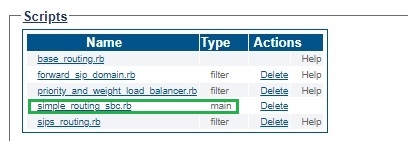
Include the filter script in the main script, default is simple_routing_sbc.rb.
Note: Only one "main" script should show the set of the Scripts:
Gateway->Routes->Routing Script->Edit the main script:

Note: if label routing or other before_filter script are used, please place ClearIP_query last
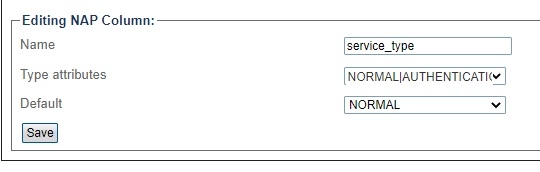
Add service_type in NAPs Column

Set the value to "AUTHENTICATION" for CLEARIP NAPs
Scenario 1:One ClearIP NAP
Follow the procedures in this scenario of you will only have one ClearIP NAP and do not need to differentiate between inbound and outbound calls.
Create Transport Server for ClearIP NAP
Create ClearIP NAP
Set service_type to "AUTHENTICATION" for NAP_CLEARIP
Add Route to NAP_CLEARIP
Scenario 2: More than one ClearIP NAP
Follow the procedures in this scenario if you have more than one ClearIP NAP and must differentiate between inbound and outbound calls.
Create 2 TCP transport servers: one for inbound and one for outbound
Create Inbound ClearIP NAP and Outbound ClearIP NAP
Set service_type to "AUTHENTICATION" for NAP_CLEARIP_IN and NAP_CLEARIP_OUT
Add Routes to NAP_CLEARIP_IN and NAP_CLEARIP_OUT
Final Common Procedures
Follow these procedures to wrap up the ProSBC configuration work. They apply to both previously described scenarios.
Configure other Routes
You need to configure other routes after the ClearIP routes if you want ProSBC to perform route advances upon receiving 503 or 302.
Configure Route Retry Action for the related Reason Cause Code
Route retry action of 3xx, 404 and 603 must be configured to allow ProSBC to perform failover, fraud control and SHAKEN AS/VS request.
Note:
The default route retry action of 404 is Stop call.
The default route retry action of 603 is Continue call.
Last updated
Was this helpful?